Choose your water
Select a U.S. fishing location. Save your places and preferred tide references to your account for use across signed-in devices.
 Angler Window
FOR THE WAY YOU FISH
Five days of weather. Your own preferences. A clearer view of when to get on the water.
U.S. fishing locations · No card required for beta testing
FROM FORECAST TO FISHING PLAN
Angler Window brings weather, your preferred conditions and useful trip context into one place.
Select a U.S. fishing location. Save your places and preferred tide references to your account for use across signed-in devices.
Review daylight fishing windows, then explore morning, midday and afternoon conditions and the reasons behind each score.
Set wind, rain, cloud and temperature preferences. See how weather and solunar overlap contribute to a transparent 0–11 score.
Tide references and official weather alerts are shown separately from the score. Check local conditions and official guidance before heading out.
A LOOK INSIDE ANGLER WINDOW
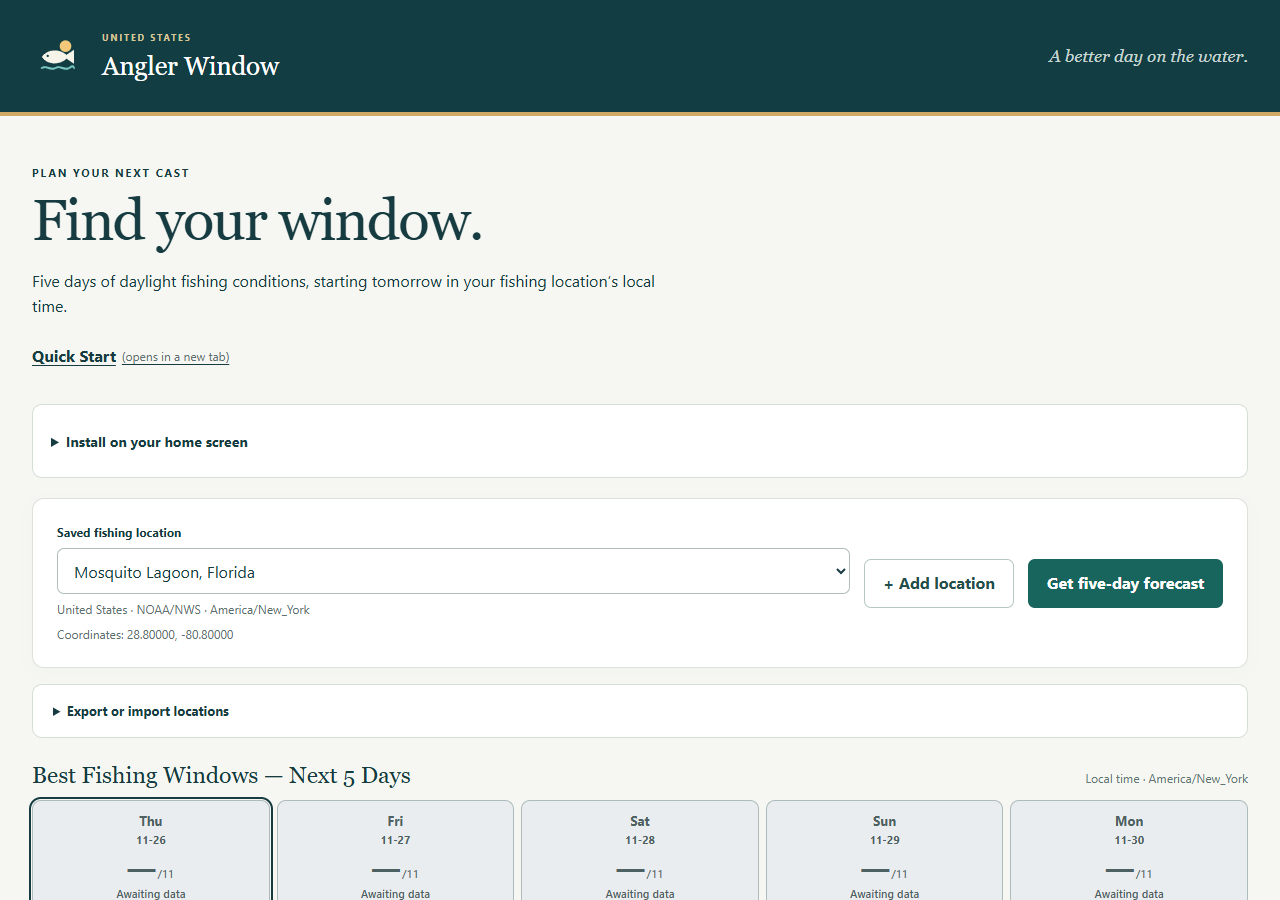
Actual captures of the local Angler Window interface. These show the initial state before requesting weather; dashes mean no forecast has been loaded. The beta release may differ.

KEEP AN EYE ON YOUR CHOSEN DAY
Track a fishing date to keep the original forecast and scoring preferences. The evening before, compare refreshed conditions with that baseline.
The comparison is scheduled for 7 p.m. in the fishing location’s timezone. It can show improved, about the same, diminished or an unavailable update.
Learn about device notificationsILLUSTRATIVE WORKFLOW · NOT A LIVE FORECAST
WHEN YOU TRACK A DATE
The original weather and your preferences are saved together.
THE EVENING BEFORE · 7 P.M.
A refreshed comparison helps you revisit your plan.
ON YOUR DEVICE
Opt in to app push notifications on each device.
HELP & GETTING STARTED
Use the app in your browser or add Angler Window to your Home Screen.
Use the email address that received your invitation. Select Send sign-in code, check your inbox and spam folder, then enter the eight-digit code. Never share your code.
Open the app in Safari. Tap Share, then Add to Home Screen. Enable Open as Web App if offered, then tap Add. Open the fish icon to return.
Open the app in Chrome. Use Install app or Add to Home screen in the browser menu. If you opened a link inside another app, open it in Chrome first.
Choose a saved U.S. fishing location and select Get five-day forecast. The outlook begins tomorrow; times follow the fishing location. Open a day to compare its windows and score details. Gray or incomplete means information is missing.
Where available in your release, open My trackers and enable push on each device. On iPhone, use the installed Home Screen app. Send a test notification and check device permissions and Focus settings. Push requires connectivity.
Export your saved locations before changing browsers, installing or clearing browser data. Keep the JSON file somewhere safe. Sign in to the same account on each device where synchronization is available.
HELP SHAPE WHAT COMES NEXT
We’re preparing a beta for up to 30 testers, with all features available throughout testing and feedback review.
The proposed coordinated testing period is 30 days once the cohort is confirmed. Reaching that date will not automatically restrict features or start billing.
Applications are not open yet. This website has no application form.
BETA ACCESS
Applications are not open yet. For beta questions or to discuss testing, email our team. An email does not reserve a place or grant app access.
Contact about the betaNo payment card required. Existing testers can continue using their invitation link.
BEFORE YOU HEAD OUT
The current app supports U.S. fishing locations using NOAA/NWS weather. Tide references depend on available NOAA stations and their relevance to your fishing area.
No. The score describes forecast conditions using your weather preferences and solunar overlap. It does not predict catches or certify safe boating conditions.
There is no charge or card requirement for beta testing. Future Free and Premium plans, prices and feature allocations will be decided after testing and feedback review.
The revised app synchronizes locations, scoring preferences and tide-station choices for the same signed-in account. Production promotion and cross-device checks will be completed before cohort use.
The cohort is limited to 30 people. When it fills, applications will close; any optional launch-update signup will be kept separate from beta admission.
Contact beta.testing@anglerwindow.com for beta questions and feedback. Describe the device, fishing location, date and what happened.
CONTACT ANGLER WINDOW
For help, beta questions or product feedback, email beta.testing@anglerwindow.com.
Include your device, browser, fishing location, date and what happened. Please leave out sign-in codes, passwords and private fishing coordinates.
app.anglerwindow.com is the planned app address. Until the move is confirmed, existing testers should use their invitation link. The public website lives at anglerwindow.com.
A BETTER LOOK AT THE DAYS AHEAD